I installed n8n on my server, deployed it, and created my first workflow in a couple of hours. I believe you could do it in even 15 minutes :)
The problem
I run almost every day and my coach wants me to add the covered distance to the shared Google Calendar. We have an event each day at 10 pm and a weekly event with the weekly mileage.
The idea
Well, I thought since I have the distance on Strava (and Strava is so nice to offer a public API), I would just pull the distance from the Strava API and push this number into Google Calendar.
I was thinking of writing a Python script and hosting it somewhere in the cloud, BUT while I was explaining the problem to my good friend Tilman, he said that n8n would be interesting in this case and achieve the same result with less effort and costs.
I was a bit skeptical because I had heard of n8n being an “hyped” no-code automation tool. However, since I trust Tilman when it comes to engineering solutions, I tried it out and... wow!
What follows is a simple yet complete guide to get n8n running on your machine to show how easy it is to create the infrastructure for your automations.
How to get n8n running in the easiest way possible?
Prerequisites:
- Docker Engine & Docker compose
- Caddy (a web server and reverse proxy)
- A machine connected to the internet that acts as a server (for reference, I’m using an Ubuntu instance on Hetzner)
- A (sub)domain that points to your server
Setup
Note: I am hosting different applications and domains on the same server, therefore I prefer to have only one Caddy (my proxy server) instance outside Docker.
- Add the subdomain/domain to the Caddy config file.
nano /etc/caddy/Caddyfile
yoursubdomain.yourdomain.net {
    reverse_proxy localhost:5678
}
- Create a docker-compose file for n8n. You can put it wherever you like on your server. I like to have it in the /opt folder.
mkdir /opt/n8n
cd /opt/n8n
nano docker-compose.yml
 ```
 ```
services:
  n8n:
    image: docker.io/n8nio/n8n:latest
    restart: always
    ports:
      - "5678:5678"
    environment:
      WEBHOOK_URL: "https://yoursubdomain.yourdomain.net/"
      GENERIC_TIMEZONE: "Europe/Vienna"
      N8N_PROXY_HOPS: "1"
    volumes:
      - n8n_data:/home/node/.n8n

volumes:
  n8n_data:
docker compose up -d
You can also configure it to have the environment variables in a .env file!
This is all you need! Go to your subdomain and you can use n8n immediately. At the first visit, you are asked to create an account.
My first workflow
I will not go into detail since the automation is useless for 99% of people.
First however, here is the workflow as image:
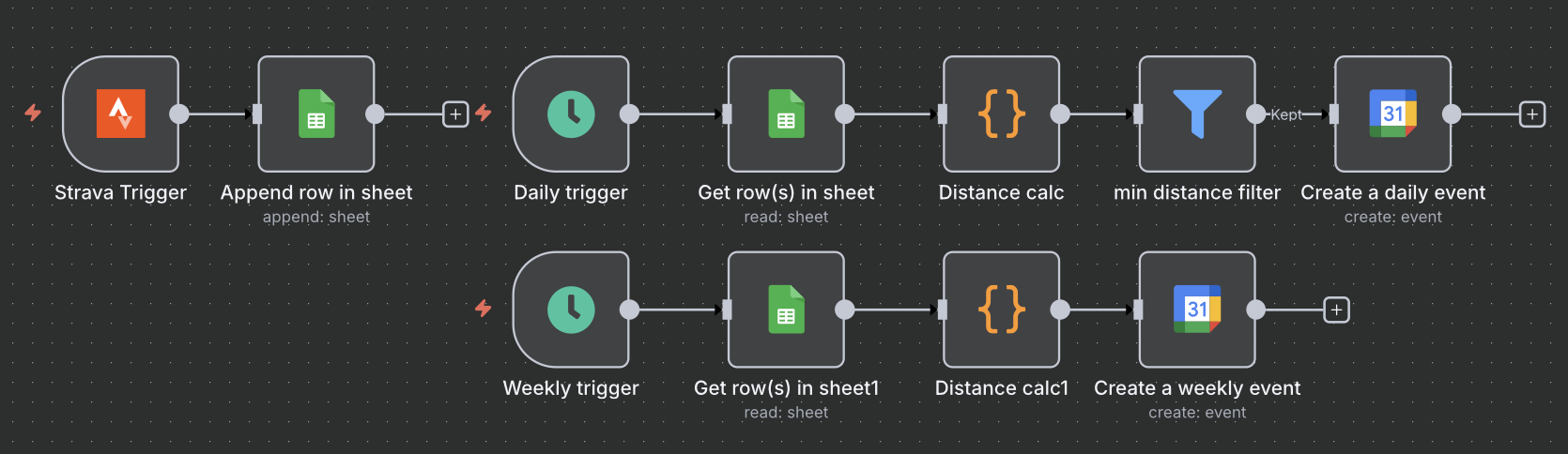
Second however, some key takeways are:
- Major troubleshooting was figuring out why the webhook URL pointed to localhost instead of my domain. The solution was adding the parameter WEBHOOK_URL in the docker-compose.
- I spent the most time creating and enabling access for the API services on Google & Strava. I found the n8n docs to be very generic in this aspect.
- I tried to minimize the “communication” cost between external (API requests outside the server) and internal nodes, but I was not successful in most cases. For example, instead of fetching all rows from my Google Sheet and then filtering in a separate internal node, I tried to filter first and pass only the filtered rows to the next node but this was somehow not possible. I think this is okay and a compromise people are willing to make for having a drag-and-drop tool, but needs to be considered when moving large data.
- I tried to avoid python/js code completely, but I found that having a code node simplified the workflow. Instead of multiple nodes, I could tie the logic to a single code node. In terms of computational costs, I’m not sure if this is a gain at all, since the workflow steps are sequential anyway.
- There are a lot of “connectors” (aka pre-configurations) for third-party tools where you only need to add your client ID and secret and then select the API method. Luckily, I could find connectors for Google Calendar and Strava.
- Overall it took me only a few hours of work to install, configure, and create my first automated workflow.
- I would like to use n8n for future automations, since it can be self-hosted and free! But for now, I don’t have any use cases (: